Data essentials
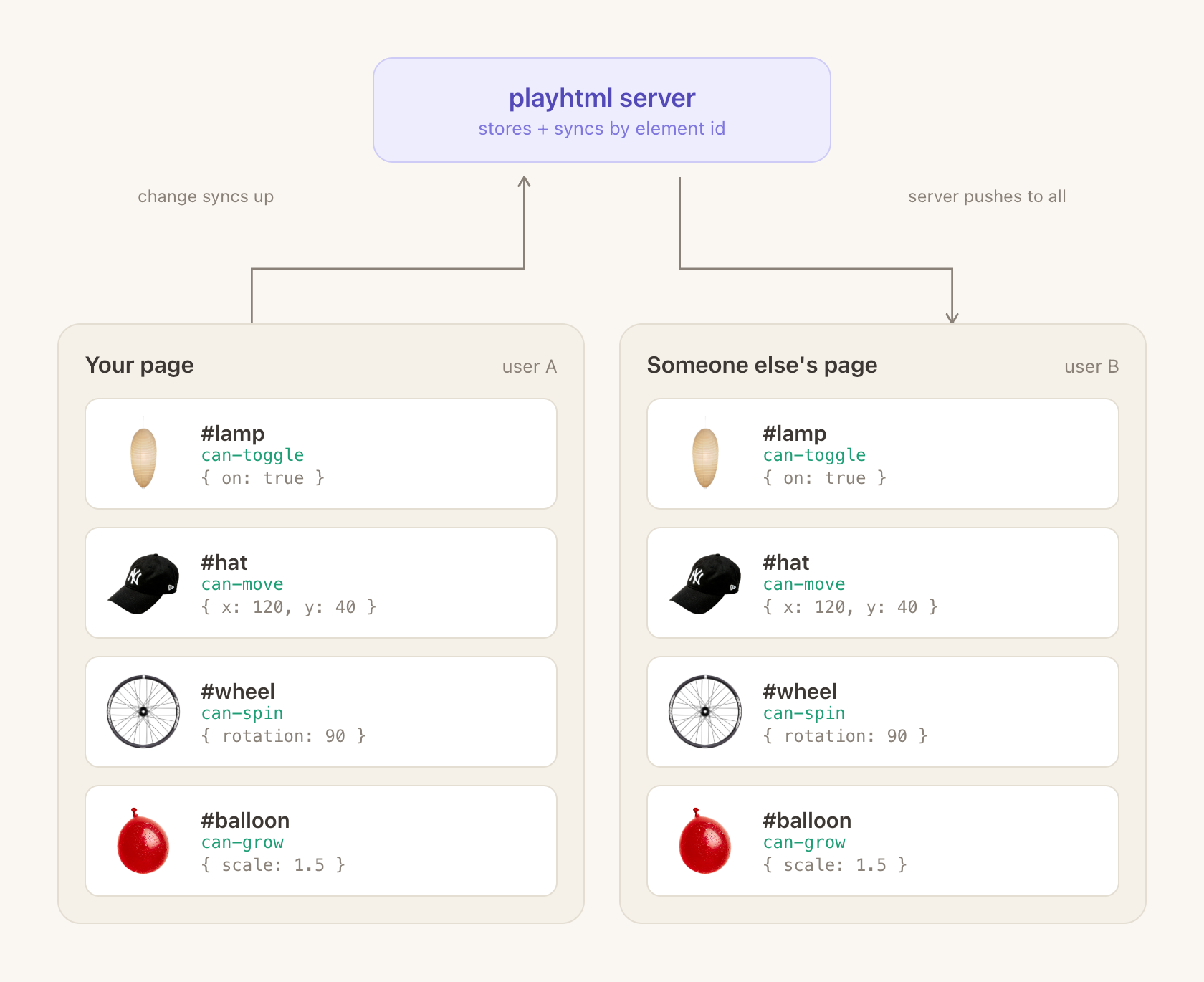
Every playhtml element owns a piece of shared data, keyed by the element’s id. When you change an element, its data updates and syncs to everyone else on the page — the element with the same id on their side updates to match. This page covers how to shape that data, write to it correctly, and clean it up when elements go away.
When to use which primitive
Section titled “When to use which primitive”playhtml has four primitives for moving state between readers. Pick by lifetime first (“should this survive a reload?”), then by scope (“does this belong to one element, the whole page, or one user?”).
| Want | Use | Survives reload | Scope |
|---|---|---|---|
| A toggle, position, count, or any state tied to one element | Element data (defaultData / can-play) | Yes | One element |
| A page-wide counter, prompt, or vote not tied to a DOM node | Page data (playhtml.createPageData) | Yes | One page |
| ”Who is connected right now?” / “How many readers?” | Presence (playhtml.presence.getPresences()) | No | Per-user |
| ”Who’s typing in this input?” / live status | Custom presence channel or element live data | No | Per-user |
| ”Where is everyone’s cursor?” | Cursors | No | Per-user |
| Confetti burst, chime, notification | Events (dispatchPlayEvent) | No (fires once) | Broadcast |
| ”How many people reacted to this post?” | Element data (a count field) | Yes | One element |
Two rules that catch most mistakes:
- If a new reader opening the page should see the state, it’s persistent data. If they shouldn’t, it’s presence or an event.
- If you’re reaching for
localStorageto make state survive a reload, you wanted persistent data. UselocalStoragefor per-user preferences that should not sync; see rule 8 below.
Updating data: mutator vs replacement
Section titled “Updating data: mutator vs replacement”setData accepts two shapes, and the one you pick determines merge semantics. Picking wrong can silently clobber concurrent edits from other readers.
For a deeper guide to numbers, lists, keyed collections, nested fields, and whole-value replacements, see Merging data changes.
Mutator form (merge-friendly)
Section titled “Mutator form (merge-friendly)”Pass a function that receives a draft and mutate it in place. playhtml ships only the delta, so two readers appending to the same list will both land. This is the recommended form for counters, increments, arrays, nested objects, and any update that should build on the value at write time.
setData((draft) => {
  draft.messages.push({ text: "hello" });
});

setData((draft) => {
  draft.count += 1;
});
Replacement form (overwrite)
Section titled “Replacement form (overwrite)”Pass a full value. This replaces the entire snapshot. Last write wins. Safer for booleans and small atomic objects where “the whole thing” is always what you mean.
setData({ ...data, on: !data.on });For counters and +/- changes, prefer the mutator form. It updates the draft at write time instead of copying a rendered data snapshot back into shared data.
Supported array operations in mutator form
Section titled “Supported array operations in mutator form”The mutator form is backed by a CRDT, which means a specific subset of array operations are safe. Everything else either silently no-ops or throws.
Supported:
setData((draft) => {
  draft.items.push(newItem);

  draft.items.splice(0, 1);              // remove first
  draft.items.splice(2, 0, newItem);     // insert at index 2
  draft.items.splice(2, 1, replacement); // replace element at index 2

  draft.items[0].name = "updated";       // mutating a nested object IS fine
});
Unsupported (throws at runtime):
setData((draft) => {
  draft.items.shift();          // use splice(0, 1)
  draft.items.pop();            // use splice(-1, 1)
  draft.items[index] = newItem; // use splice(index, 1, newItem)
});
The throwing errors read “array assignment is not implemented / supported”. If you hit one, translate it into the matching splice call.
Shaping your data
Section titled “Shaping your data”How you lay out the object you pass to defaultData has a real effect on performance, sync bandwidth, and how painful the code is to refactor later. Eight rules, in order of frequency.
1. Keep shapes flat
Section titled “1. Keep shapes flat”Deeply nested objects are harder to update, slower to sync, and more conflict-prone. One level of nesting is fine for obviously-related fields; beyond that, flatten.
// Good
defaultData: { x: 0, y: 0, color: "#ff0000", size: 100 }

// Acceptable (one level, fields are clearly related)
defaultData: { position: { x: 0, y: 0 }, color: "#ff0000" }

// Avoid
defaultData: {
  position: { coords: { x: 0, y: 0 } },
  style: { appearance: { color: "#ff0000" } },
}
2. Don’t store computed or derived values
Section titled “2. Don’t store computed or derived values”Compute them when you render — in update or view (vanilla), or the render function (React). Storing them means they go stale whenever the source changes and you forget.
// Good — derive at render time. Either vanilla form works:

// imperative — update
defaultData: { count: 5 }
update: ({ element, data }) => {
  element.textContent = `${data.count} (${data.count % 2 === 0 ? "even" : "odd"})`;
}

// reactive — view
defaultData: { count: 5 }
view: ({ data }) => html`
  ${data.count} (${data.count % 2 === 0 ? "even" : "odd"})
`

// Avoid — storing the derived value
defaultData: { count: 5, isEven: false }
Common offenders: formatted date strings, totals/averages, filtered/sorted arrays, boolean flags derived from other fields.
3. Pick the right data type
Section titled “3. Pick the right data type”playhtml gives you three places to put state. Use the one that matches the lifetime you actually want.
| Type | Survives reload | Use for |
|---|---|---|
Persistent (defaultData) | Yes | Positions, counts, messages, settings, toggles |
| Presence, including element live data | No | Who’s online, typing indicators, colors, per-user cursor data |
| Events | No (fire once) | Confetti bursts, notifications, chimes |
If someone refreshes the page and expects the state to still be there, it’s persistent data. If a new reader opening the page for the first time should not see a historical replay, it’s presence or an event.
4. Don’t update on high-frequency DOM events
Section titled “4. Don’t update on high-frequency DOM events”Syncing on every mousemove or scroll will flood the socket and eat your PartyKit bill. Three options, in order of preference:
Use built-in handlers. onDrag, onMount already debounce:
playhtml.register("draggable", {
  defaultData: { x: 0, y: 0 },
  onDrag: (event, { setData }) => {
    setData({ x: event.clientX, y: event.clientY });
  },
  update: ({ element, data }) => {
    element.style.translate = `${data.x}px ${data.y}px`;
  },
});
Debounce yourself when you need your own event:
let pending;
element.addEventListener("mousemove", (e) => {
  clearTimeout(pending);
  pending = setTimeout(() => setData({ x: e.clientX, y: e.clientY }), 100);
});
Local-state-then-commit. Keep ephemeral state local, sync only on the commit event (mouseup, blur, submit):
let localX = data.x;
element.addEventListener("mousemove", (e) => {
  localX = e.clientX;
  element.style.left = `${localX}px`;
});
element.addEventListener("mouseup", () => {
  setData({ x: localX });
});
5. Bound growing lists
Section titled “5. Bound growing lists”An unbounded messages / history array will grow forever. It survives every reload, which means the load cost compounds.
// Keep last 100
setData((draft) => {
  draft.messages.push(newMessage);
  if (draft.messages.length > 100) {
    draft.messages.splice(0, draft.messages.length - 100);
  }
});

// Or time-bucket
setData((draft) => {
  const cutoff = Date.now() - 24 * 60 * 60 * 1000;
  draft.messages = draft.messages.filter((m) => m.timestamp > cutoff);
  draft.messages.push(newMessage);
});
For moderated sites with long histories, store only recent items in shared state and fetch the archive from your own DB.
6. Store only what needs to sync
Section titled “6. Store only what needs to sync”UI-only state, loading flags, animation state: none of that belongs in shared data. Use component state (React) or plain variables (vanilla).
// Bad — every reader sees every other reader's hover
defaultData: { isHovering: false }

// Good — hover is a local concern
element.addEventListener("mouseenter", () => element.classList.add("hover"));
If you do want collaborative hover, use can-hover. That’s its reason to exist, and it uses presence (not persistent data) internally.
7. Never write shared data from code that re-runs when that data changes
Section titled “7. Never write shared data from code that re-runs when that data changes”This one doesn’t fail on your machine. It fails in production once a few readers connect, and it can grow the shared document until the sync server falls over.
The trap: a React effect (or any reactive subscription) that both depends on the shared data and writes to it.
// DANGER — infinite write loop
const Roster = withSharedState({ defaultData: { entries: [] } }, ({ data, setData }) => {
  useEffect(() => {
    setData({ entries: [...data.entries, me] }); // writing entries…
  }, [data.entries]);                             // …re-runs because entries changed
  return <div />;
});
Each write changes data.entries, which re-runs the effect, which writes again. Worse, because the data is a CRDT, two readers writing concurrently both land. With the replacement form (setData({ entries: [...] })) over an array, concurrent writes append rather than overwrite, so the loop never converges to a stable value the guard can catch. A single buggy element like this grew one production room to 1.2 million CRDT operations / 23 MB and took the room offline.
The strongest fix is the data model: store collections that must stay unique as a keyed map, and upsert in place with the mutator form.
// entries is keyed by id, not an array
const Roster = withSharedState({ defaultData: { entries: {} } }, ({ data, setData }) => {
  const me = useMe(); // { id, name } — the only thing that should trigger a write
  const ref = useRef(data.entries);
  ref.current = data.entries;

  useEffect(() => {
    const existing = ref.current[me.id];
    if (existing && existing.name === me.name) return; // already correct
    // Keyed mutator write — assigning entries[id] overwrites in place. Writing
    // the same id N times can never duplicate, and concurrent writes from two
    // clients merge cleanly (maps are last-write-wins per key). Idempotent by
    // construction — the loop, even if it fired, could not grow the doc.
    setData((draft) => { draft.entries[me.id] = me; });
  }, [me.id, me.name]); // depends on local identity, NOT on data.entries
  return <div />;
});
Two reinforcing rules at work here:
- Prefer a keyed map + mutator-form upsert over an array + replacement-form rewrite. The keyed write is idempotent and merge-safe; the array rewrite is neither. This alone defuses the runaway.
- Still don’t depend on the data you write. Read it through a ref so the effect fires only on the inputs that should trigger a write (the local user’s identity), not on every change to the shared collection. Belt-and-suspenders on top of the keyed model.
If you genuinely need an array (order matters and there’s no natural key), then you must both (a) read via a ref as above and (b) make the write converge (dedupe by id into a Map and write the deduped result), but a keyed map is almost always the better shape.
The same rule applies to vanilla update: never call setData from inside update (which runs on every data change) without a guard that provably converges. When in doubt, write only from explicit user events, not from reactive callbacks.
8. Use localStorage for per-user preferences
Section titled “8. Use localStorage for per-user preferences”Some state is personal: “has this user already reacted”, collapsed sections, display-name choice, notification settings. That data should not sync.
const reactedKey = `reacted-${elementId}`;

onClick: (_e, { setData }) => {
  const hasReacted = Boolean(localStorage.getItem(reactedKey));

  if (hasReacted) {
    setData((draft) => { draft.count -= 1; });
    localStorage.removeItem(reactedKey);
  } else {
    setData((draft) => { draft.count += 1; });
    localStorage.setItem(reactedKey, "true");
  }
};
Anti-patterns
Section titled “Anti-patterns”Three mistakes that show up often enough to call out explicitly.
Syncing UI state. Hover, focus, loading, animation progress. These should be local.
Over-normalizing. playhtml data is a document, not a relational database. A flat array of message objects beats a users: {…} + messages: {…} split every time.
// Too normalized for playhtml
{ users: { "u1": { name: "Alice" } }, messages: { "m1": { userId: "u1", text: "Hi" } } }

// Simpler, faster, less to maintain
{ messages: [{ id: "m1", author: "Alice", text: "Hi" }] }
Unbounded arrays with no cleanup. Any push without a matching size check will eventually bite you.
Self-triggering writes. Writing shared data from a reactive callback that depends on that same data. It survives local testing and only breaks under concurrency in production. See rule 7.
Cleaning up
Section titled “Cleaning up”When you delete an element at runtime, its playhtml data stays behind by default. For element types like can-move that store per-element position data, this accumulates fast.
Runtime cleanup
Section titled “Runtime cleanup”playhtml.deleteElementData("can-move", elementId);This removes the SyncedStore entry, observer subscriptions, and element handlers.
Example, a fridge magnet app deleting words:
function handleDeleteWord(id: string) {
  setWords((prev) => prev.filter((w) => w.id !== id));

  if (window.playhtml) {
    window.playhtml.deleteElementData("can-move", id);
  }
}
Admin cleanup (bulk)
Section titled “Admin cleanup (bulk)”For sites that didn’t clean up at runtime and need to sweep orphans, there’s an admin endpoint.
POST /parties/main/{roomId}/admin/cleanup-orphans{
"tag": "can-move",
"activeIds": ["id1", "id2", "id3"],
"dryRun": false
}{
"ok": true,
"tag": "can-move",
"total": 5000,
"active": 100,
"removed": 4900,
"message": "Removed 4900 orphaned entries"
}There’s a helper script in the repo for doing this from a terminal:
export ADMIN_TOKEN=your_token_here

# Dry run first to see what would be removed
DRY_RUN=true bun scripts/cleanup-orphans.ts "playhtml.fun-fridge" "can-move" "id1" "id2" "id3"

# Actually perform the cleanup
bun scripts/cleanup-orphans.ts "playhtml.fun-fridge" "can-move" "id1" "id2" "id3"
Practice: always dry-run first; always derive the activeIds list from your own data store, never from the playhtml state you’re about to delete.
Performance checklist
Section titled “Performance checklist”When reviewing a new element’s data shape:
- Is this actually shared, or should it be local?
- Could it be derived from other data instead of stored?
- Will the arrays grow unbounded?
- Does any effect/callback write shared data and depend on that data? (write loop; see rule 7)
- Am I about to update on a high-frequency DOM event?
- Is there a built-in
can-*capability that already does this? - Should this live in presence / events instead of persistent data?
- Are there per-user preferences that want
localStorage?